
Automated face extraction, resizing and alignment suitable to make a selfie timelapse video.
Immich Selfie Timelapse
Generate timelapse videos of your loved ones' portraits from your Immich photo library.
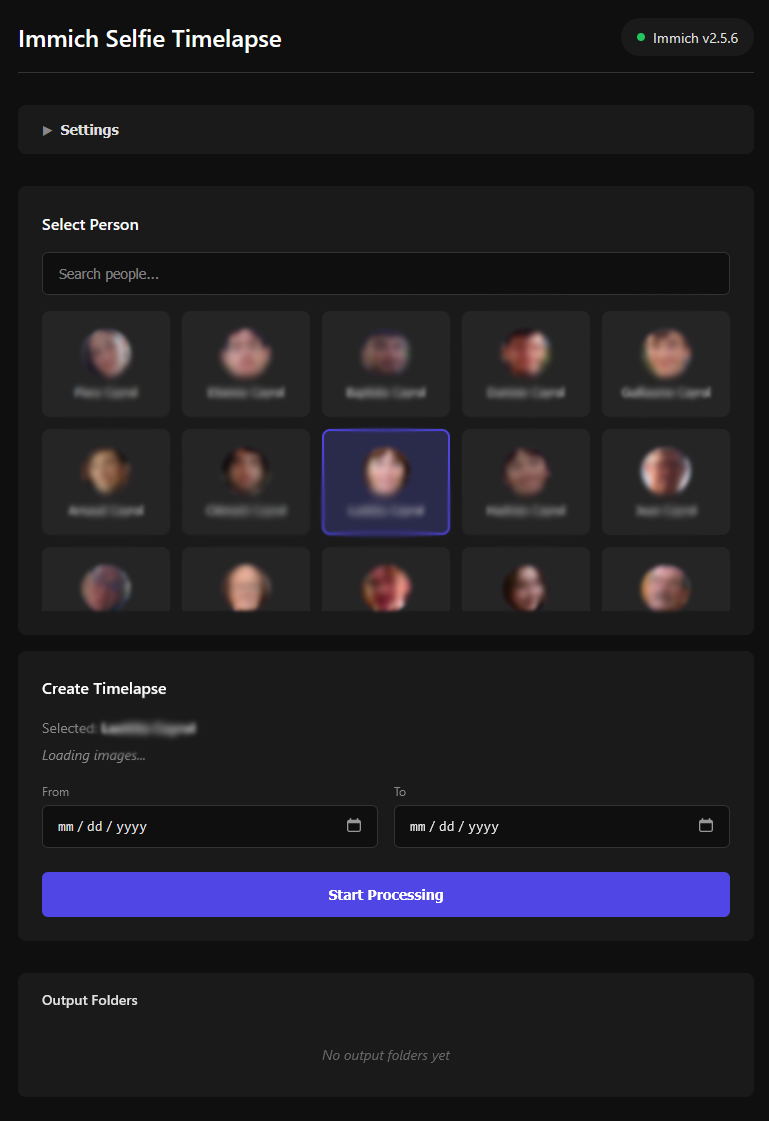
Use Immich's built-in face recognition to find all photos of a person, then runs them through a configurable processing pipeline that crops, aligns, filters, and compiles the results into a smooth timelapse video.

Features
- Face detection & cropping - Uses Immich's face recognition metadata to locate and crop faces automatically
- Face alignment - Aligns all photos based on eye positions for a stable, smooth timelapse
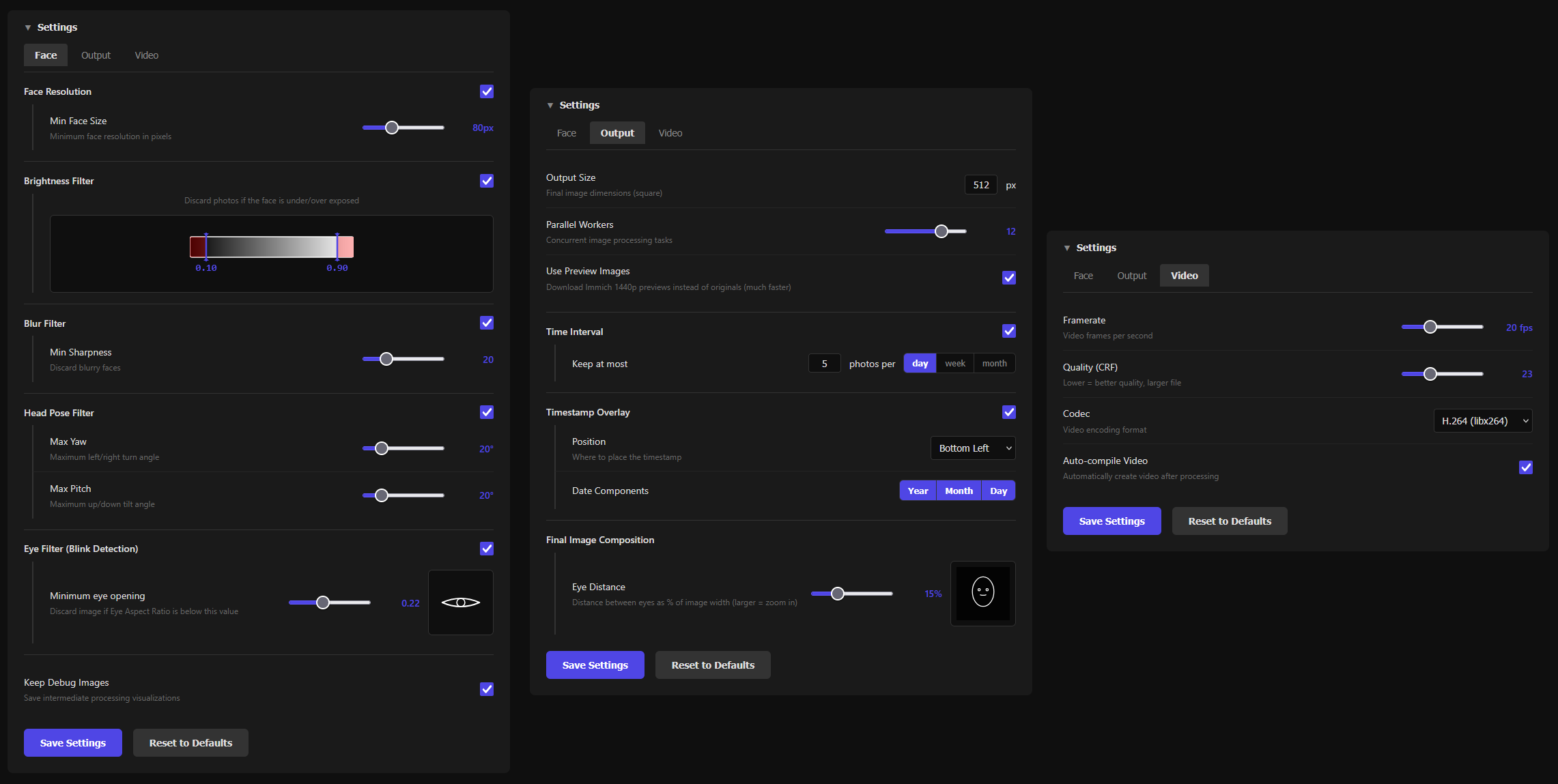
- Head pose filtering - Skips non-front-facing photos using an ONNX deep learning model (DMHead)
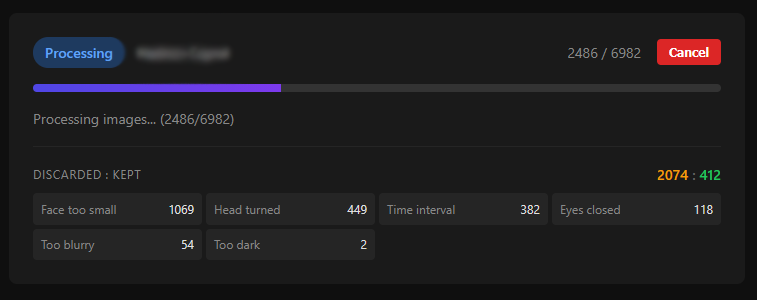
- Blink detection - Filters out photos where eyes are closed using Eye Aspect Ratio analysis
- Blur detection - Discards blurry photos using gradient magnitude analysis (Sobel operator)
- Brightness filtering - Removes photos that are too dark or overexposed
- Face resolution filtering - Skips photos where the face is too small
- Photo limiting - Caps photos per day/week/month to avoid over-representing busy periods
- Timestamp overlay - Optionally overlays the date on each frame
- Video compilation - Automatically compiles processed photos into an MP4 timelapse using FFmpeg
- Web UI - Configure all settings and monitor progress through a built-in web interface
Quick Start
Immich API key
To access your immich library, this project requires an Immich API key. Follow this guide to create one: https://immich.app/docs/features/command-line-interface#obtain-the-api-key
Here are the features that need to be enabled:
album.readasset.downloadasset.readasset.viewface.readperson.readserver.about
.env file adjacent to your docker-compose.yml rather than in plain text.
Docker Compose (recommended)
Feel free to deploy this container on a more powerfull PC for faster timelapse generation. This is a 'one shot' application, it does not necessarily need to be deployed on a always on server.
services:
  immich-selfie-timelapse:
    image: arnaudcayrol/immich-selfie-timelapse
    container_name: immich-selfie-timelapse
    user: 1000:1000
    ports:
      - "5000:5000"
    environment:
      - IMMICHAPIKEY=abcdefghijklmnopqrstuvwxyz
      - IMMICHBASEURL=http://your-immich-host:2283
    volumes:
      - ./config:/app/config
      - ./output:/app/output
    restart: unless-stopped
Docker Run
docker run -d \
  --name immich-selfie-timelapse \
  -p 5000:5000 \
  -e IMMICHAPIKEY=your-api-key-here \
  -e IMMICHBASEURL=http://your_server:2283 \
  -v ./config:/app/config \
  -v ./output:/app/output \
  arnaudcayrol/immich-selfie-timelapse
Then open http://your_server:5000 to access the web interface.
Volumes
Ensure correct read/write permissions to the config and output folders.
chown -R 1000:1000 ./config ./output| Path | Description | |---|---| | /app/config | Persisted configuration file (config.toml) | | /app/output | Processed images and compiled timelapse video |
Settings
The default settings are quite permissive because every human being is unique. Please adjust image brightness filtering, eye aspect ratio etc. for the person you are processing.
Additional info
- To get the best results, I advise going into the galery view and quickly going through the images to remove bad ones, then hit "Compile video" at the bottom to recreate the video. There are always outliers that pass the quality filters. Removing bad photos makes a big difference in the final output.
- The photo filtering is not 100% accurate and will continue to improve.
- Heartfelt thanks to the Immich team and contributors for making this project possible.
- About contribution : When I first created this project, I marked it as open to contributions. I now realize that I don't have as much time as I thought to dedicate to this project. I feel comfortable with issues being opened as it allows me to go through them at my own pace. For pull requests, I cannot guarantee a reasonable time frame for review.
- Thank you thomaslrg for the discussions around the project.
- Thank you for the
200300600 GitHub stars !
License
This project is open source and available under the MIT License.


