
Application delivery engine for k8s






Engine for development teams that simplifies the roll-out and operation of container-based applications on Kubernetes. It introduces a service-centric abstraction, which allows users to compose applications from multiple connected components. It supports components packaged using Helm, ksonnet, k8s YAMLs, and any other Kubernetes-friendly way!
This approach to application delivery becomes especially powerful in a multi-team setup, where components owned by different teams must be put together into a service. With ownership boundaries, Dev teams can specify multi-cluster and multi-env (e.g. dev, stage, prod) service behavior, as well as control the lifecycle and updates of their respective services.
It also provides contextual visibility into teams and services, allowing our users to visualize complex dependencies and accurately assess the impact of changes.
Overview
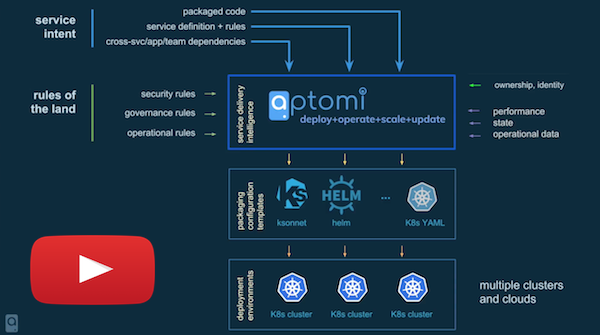
You can also read this blog post about the project.
Demos
Asciinema
- Installation - https://asciinema.org/a/163250
- Point to Kubernetes cluster - https://asciinema.org/a/163252
- Defining & running applications - https://asciinema.org/a/163258
- Updating a service instance - https://asciinema.org/a/163262
- Deleting service instances - https://asciinema.org/a/163269
Youtube
- Detailed Demo - http://www.youtube.com/watch?v=HL4RwoBnuTc
- OpenDev CI/CD 2018 (Vancouver) - https://www.youtube.com/watch?v=GVB3kKocKi4
Table of contents
- Step #1: Installation - Step #2: Setting up k8s Cluster - Step #3: Running Examples - Step #4: Send us a note on Slack - Architecture - LanguageWhy?
- Why would I want to use it as a Developer?
- Why would I want to use it as an Operator?
- How does it fit into CI/CD model with Spinnaker/Jenkins?
- Why would I want to use it if I'm already implementing Kubernetes/OpenShift?
Quickstart
Step #1: Installation
The simplest installation mode is Compact, but you may pick one that suits your needs:Installation Mode | Complexity | Description ----------------------|------------|------------- Compact | Easy | Installation on local machine (binaries or in a single Docker container) Kubernetes | Medium | Deployed to k8s via Helm chart
You can also install it in a stripped-down mode with a fake executor:
Installation Mode | Complexity | Description ----------------------|------------|------------- Concepts | Easy | Use this only if you want get familiar with the key concepts, API and UI. App deployment to k8s is DISABLED
Step #2: Setting up k8s Cluster
You will need to have access to a k8s cluster to deploy apps from the provided examples.
Having a powerful k8s cluster with a good internet connection will definitely provide a better experience compared to a local, single-node k8s cluster. We consider GKE to be the best option if you don't have your own k8s cluster.
Kubernetes Cluster | When to use | How to run ------------|-----------------|----------- Your own | If you already have a k8s cluster set up | Configure on existing k8s cluster Google Kubernetes Engine | If you have a Google account and free credits | Configure on GKE k8s / Minikube | Single-node, local machine with 16GB+ RAM | Configure on Minikube k8s / Docker For Mac | Single-node, local machine with 16GB+ RAM | Configure on Docker For Mac
Step #3: Running Examples
Once the server is up and your k8s cluster is ready, you can get started by running the following examples:
Example | Description -----------|------------ twitter-analytics | Twitter Analytics Application, multiple services, multi-cloud, based on Helm twitter-analytics-with-concourse-ci | Twitter Analytics Application, integrated with Concourse CI/CD pipelines guestbook | K8S Guestbook Application, multi-cloud, based on K8S YAMLs
Step #4: Send us a note on Slack
Give us your feedback on #general in . If you run into any issues, we are always happy to help you resolve them!
How It Works
Architecture
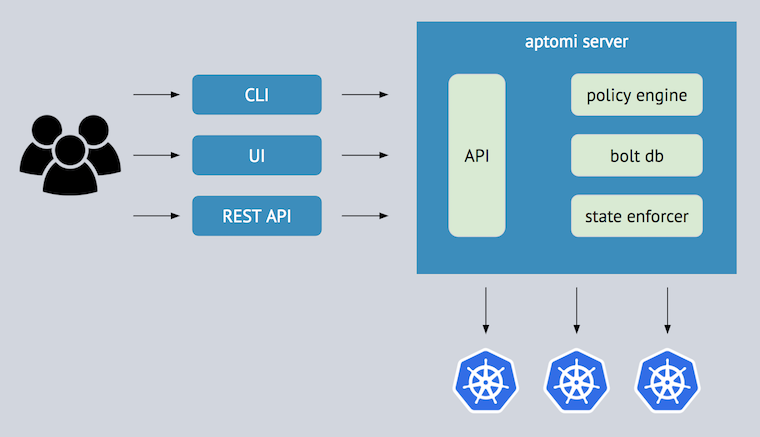
See artchitecture documentation
Language
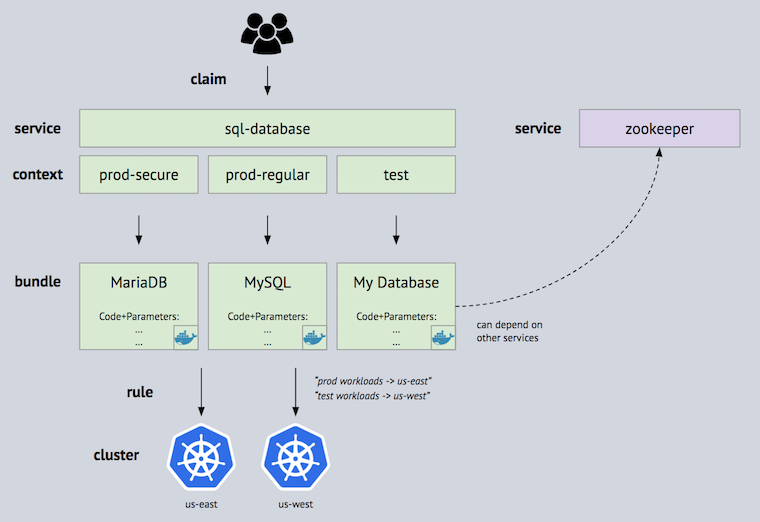
How to contribute
The very least you can do is report a bug!If you want to make a pull request for a bug fix or contribute a feature, see our Development Guide for how to develop, run and test your code.
We are always looking for feedback on how to make the project better. Join our Slack to discuss .
Roadmap
Feature Backlog, as well as weekly project milestones, are good places to look at the roadmap items.If you have any questions, please contact us on .


