
Tado Local - Manage TADO devices locally
Tado Local
A REST API backend for local Tado thermostat control - No cloud dependencies, no rate limits, instant response times.



🎯 What is Tado Local?
Tado Local is a REST API backend that connects your Tado smart heating system directly to your home automation platform. It serves as the common integration layer for multiple smart home systems.
Core Features
- ⚡ REST API - Clean HTTP endpoints for any integration (Domoticz, Home Assistant, openHAB, Node-RED, etc.)
- 🔄 Real-time Updates - Server-Sent Events (SSE) stream for instant state changes
- 💾 Local Storage - SQLite database with complete state history (10-second resolution)
- 🔌 Direct Local Control - HomeKit protocol communication with your Tado bridge - no cloud required
- 📊 Setup & Debug UI - Web interface for initial configuration and troubleshooting
- 🔧 Interactive API Docs - Built-in Swagger UI at
/docs
Why Choose Local Control?
Tado's cloud API has strict rate limits that can break home automation integrations. Traditional solutions require running full Home Assistant instances just to access one device.
Tado Local changes that. Using the HomeKit protocol built into your Tado bridge, this tool provides a fast, reliable REST API backend that works with any platform. Set it up once, integrate everywhere.
� Quick Start
Step 1: Install
# Clone the repository
git clone https://github.com/ampscm/TadoLocal.git
cd TadoLocal
Install (requires Python 3.11+)
pip install -e .
Step 2: First-Time Setup
Find your bridge information:
- Bridge IP Address: Check your router's connected devices list for "Tado"
- HomeKit PIN: Found on a sticker on your Tado bridge (format: XXX-XX-XXX)
tado-local --bridge-ip 192.168.1.100 --pin 123-45-678Step 3: Complete Cloud Authentication
- Open your browser to
http://localhost:4407 - Check the Cloud status in the web interface
- If authentication is needed, click the "Authenticate" link
- Log in with your Tado account credentials
- Done! The setup UI will show all systems are connected
The REST API is now running at http://localhost:4407
- API Documentation: Visit
http://localhost:4407/docsfor interactive Swagger UI - Domoticz: Install the included plugin from
domoticz/directory (see Domoticz Integration) - Home Assistant: Use REST integration (see Home Assistant Integration)
- Custom Integration: Use any HTTP client to call the API endpoints
tado-local - no arguments needed!
📡 REST API - The Integration Layer
Tado Local provides a comprehensive REST API designed to be the common backend for all your smart home integrations.
Base URL: http://localhost:4407
Key Endpoints
# Get all zones with current state
GET /zones
Get specific zone details
GET /zones/{zone_id}
Get all thermostats
GET /thermostats
Set target temperature
POST /thermostats/{thermostatid}/settemperature
Content-Type: application/json
{"temperature": 21.5}
Get historical data (last 24 hours by default)
GET /zones/{zoneid}/history?starttime={unix_timestamp}&limit=1000
Real-time event stream (Server-Sent Events)
GET /events
System status
GET /status
Complete API Documentation: http://localhost:4407/docs (interactive Swagger UI with try-it-now functionality)
Integration Examples
Python
import requests
TADO_API = "http://localhost:4407"
Get all zones
zones = requests.get(f"{TADO_API}/zones").json()['zones']
for zone in zones:     state = zone['state']     print(f"{zone['name']}: {state['curtempc']}°C (target: {state['targettempc']}°C)")
Set temperature
requests.post(
    f"{TADO_API}/zones/1/set",
    json={"temperature": 22.0}
)
curl
# Get current state
curl http://localhost:4407/zones
Set temperature
curl -X POST http://localhost:4407/thermostats/1/set_temperature \
  -H "Content-Type: application/json" \
  -d '{"temperature": 21.5}'
Stream live updates
curl -N http://localhost:4407/events
🏗️ Platform Integrations
Domoticz Plugin Installation
Native plugin included! Located in the domoticz/ directory.
Installation Steps:
- Copy the plugin to Domoticz:
cd /path/to/domoticz/plugins
   mkdir TadoLocal
cp /path/to/tado-local/domoticz/plugin.py TadoLocal/- Restart Domoticz:
sudo systemctl restart domoticz- Configure in Domoticz Web UI:
http://localhost:4407)
- Set retry interval (default: 30 seconds)
- Click Add
- Devices auto-created!
Features:
- ✅ Automatic zone discovery
- ✅ Real-time temperature and humidity updates
- ✅ Thermostat control (set temperature, on/off)
- ✅ Auto-reconnect on connection loss
- ✅ Detailed debug logging
domoticz/README.md
Home Assistant Integration
Integrate using the REST platform:
# configuration.yaml
sensor:   - platform: rest     name: "Living Room Temperature"     resource: "http://localhost:4407/zones/1"     valuetemplate: "{{ valuejson.current_temperature }}"     unitofmeasurement: "°C"
climate:   - platform: generic_thermostat     name: "Living Room Heating"     # Configure with REST commands
Full documentation: See home-assistant/README.md for installing TadoLocal Server as App and advanced configuration.
Other Platforms
The REST API works with any platform that supports HTTP:
- openHAB: Use HTTP binding
- Node-RED: HTTP request nodes
- HomeBridge: HTTP webhooks
- ioBroker: REST adapter
- Custom Scripts: Any language with HTTP support
🖥️ Web Interface (Setup & Debug Tool)
While the REST API is the primary interface for integrations, Tado Local includes a web UI for initial setup, configuration verification, and troubleshooting.
Access: http://localhost:4407
Use Cases
- Initial Setup: Complete cloud authentication and verify bridge connection
- Debugging: Check real-time connection status, view current readings
- Historical Analysis: View temperature trends, humidity, and heating patterns over time
- Manual Control: Directly adjust temperatures when testing or troubleshooting
- Feature Demo: Visual representation of capabilities for integration planning
Screenshots
Setup & Status View
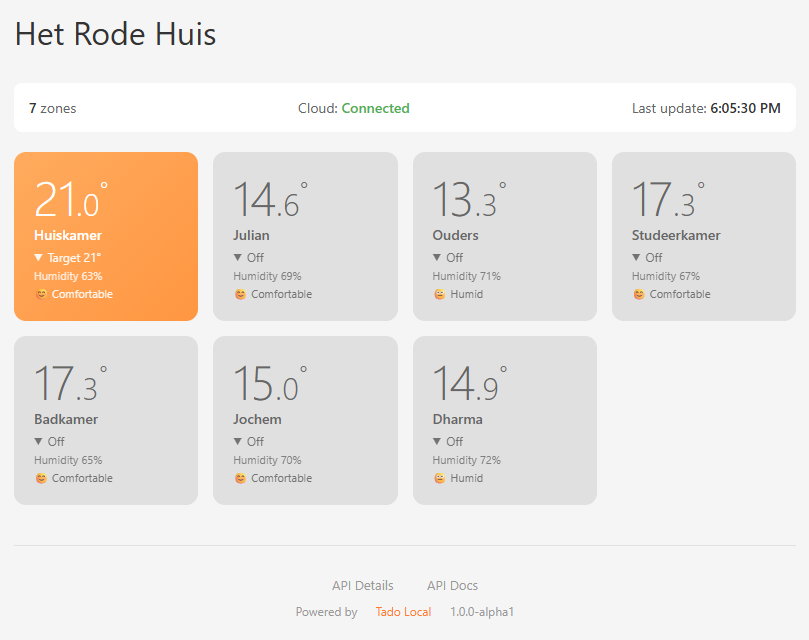 Monitor connection status and verify all zones are discovered
Manual Control (Debug Mode)
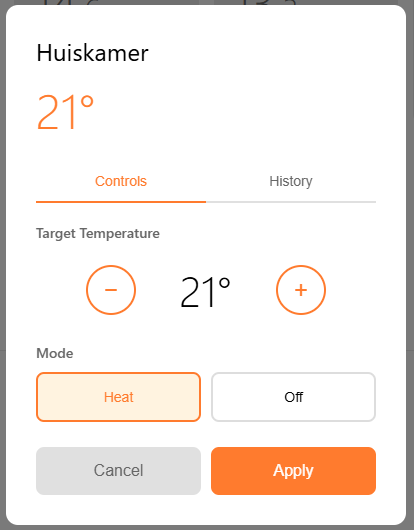 Direct temperature control for testing
Historical Data Visualization
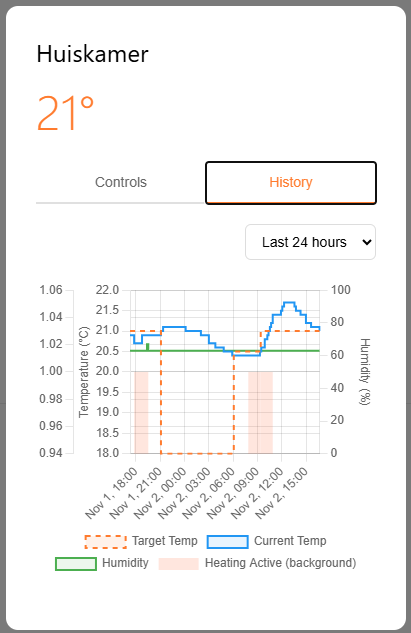 Interactive charts showing data available via the history API endpoint
Note: Most users will interact with Tado Local through their smart home platform (Domoticz, Home Assistant, etc.) rather than the web UI.
⚠️ Alpha Status
This project is currently in active alpha development. The REST API is stable and functional, but expect:
- Occasional API refinements as we gather feedback from integrators
- UI improvements for setup and debugging
- Enhanced documentation based on real-world usage
✨ Features
API & Integration
- Clean REST API with comprehensive endpoints
- Real-time Server-Sent Events (SSE) stream
- Interactive Swagger UI documentation at
/docs - State history with 10-second resolution
- Zone and device management
- Cross-platform compatibility (Windows, Linux, FreeBSD)
- Direct local HomeKit protocol communication
- Hybrid architecture: local control + cloud metadata sync
- SQLite persistence (state, history, credentials)
- Automatic reconnection handling
- No rate limits on local operations
- Web UI for initial configuration
- Connection status monitoring
- Historical data visualization
- Manual control interface
📋 Installation & Configuration
Prerequisites
- Python 3.11 or newer (Download)
- Tado Internet Bridge with HomeKit support (V3+ models)
- Network access to your Tado bridge
Installation Steps
# Clone the repository
git clone https://github.com/ampscm/TadoLocal.git
cd TadoLocal
Install the package
pip install -e .
Verify installation
tado-local --help
First-Time Setup
- Reset HomeKit pairing on your bridge (see Important Limitation below)
- Start with your bridge credentials:
tado-local --bridge-ip 192.168.1.100 --pin 123-45-678- Complete cloud authentication in your browser (for device metadata)
- Done! Future runs only need:
tado-localConfiguration Options
tado-local --help
Options:   --state PATH          Path to state database (default: ~/.tado-local.db)   --bridge-ip IP        IP address of the Tado bridge   --pin XXX-XX-XXX      HomeKit PIN for initial pairing   --port PORT           API server port (default: 4407)   --clear-pairings      Clear all existing pairings before starting   --accessory-ip IP     IP of a standalone HomeKit accessory (repeatable)   --accessory-pin PIN   HomeKit PIN for a standalone accessory (repeatable)
Standalone Accessories
Some Tado products (e.g. Smart AC Control V3+) are standalone HomeKit accessories that pair independently from the bridge. You can include them alongside the bridge:
tado-local --bridge-ip 192.168.1.100 --accessory-ip 192.168.1.101 --accessory-pin 987-65-432Multiple accessories can be added by repeating the flags. Their zones will appear in the same API alongside the bridge zones.
Optional Authentication
You can optionally secure the REST API with one or more Bearer tokens. This is useful for:
- Adding basic security when exposing the API on your local network
- Distinguishing between different clients (each gets its own key)
- Revoking access by removing specific keys
# Single API key via environment variable export TADOAPIKEYS=your-secret-key tado-local
Multiple API keys (space-separated)
export TADOAPIKEYS="key-for-domoticz key-for-home-assistant key-for-testing"
tado-local
Or as a single line
TADOAPIKEYS="key1 key2 key3" tado-local
When authentication is enabled:
- All API endpoints require
Authorization: Bearer <your-key>header - Any of the configured keys will be accepted
- Web UI (
/and/static/*) remains accessible without authentication - Provides basic protection on local networks (not cryptographically secure over HTTP)
Note: If TADOAPIKEYS is not set or empty, authentication is disabled and all endpoints are publicly accessible.
🛠️ Advanced API Usage
Get Historical Data
# Last 24 hours (default)
curl http://localhost:4407/zones/1/history
Custom time range (Unix timestamps)
curl "http://localhost:4407/zones/1/history?starttime=1699000000&endtime=1699086400"
With pagination
curl "http://localhost:4407/zones/1/history?limit=500&offset=500"
Monitor Real-Time Events
# Stream live updates (Server-Sent Events)
curl -N http://localhost:4407/events
Python Integration Example
import requests
from datetime import datetime, timedelta
TADO_API = "http://localhost:4407"
Get all zones with current state
response = requests.get(f"{TADO_API}/zones").json()
zones = response['zones']
for zone in zones:     state = zone['state']     print(f"{zone['name']}: {state['curtempc']}°C")     print(f"  Target: {state['targettempc']}°C")     print(f"  Humidity: {state['hum_perc']}%")     print(f"  Heating: {'ON' if state['cur_heating'] == 1 else 'OFF'}")     print()
Set temperature for a specific zone
requests.post(
    f"{TADO_API}/zones/1/set",
    json={"temperature": 22.0}
)
Get history for the last 7 days
end_time = int(datetime.now().timestamp())
start_time = int((datetime.now() - timedelta(days=7)).timestamp())
history = requests.get(     f"{TADO_API}/zones/1/history",     params={"starttime": starttime, "endtime": endtime, "limit": 1000} ).json()
for record in history['history']:     print(f"{record['timestamp']}: {record['state']['curtempc']}°C")
🔌 Using the Web Interface
Once Tado Local is running, open your browser to http://localhost:4407 for setup and debugging.
Primary uses:
- Initial cloud authentication
- Connection status verification
- Manual testing and debugging
- Historical data visualization
⚠️ Important Limitation
🏗️ For Developers & Integrators
REST API Integration
Tado Local provides a comprehensive REST API for integrating with any smart home platform.
Base URL: http://localhost:4407
Key Endpoints:
# Get all zones with current state
GET /zones
Get all thermostats
GET /thermostats
Get history for a zone (last 24 hours by default)
GET /zones/{zoneid}/history?starttime={unix_timestamp}&limit=1000
Set target temperature
POST /thermostats/{thermostatid}/settemperature
Content-Type: application/json
{"temperature": 21.5}
Real-time event stream
GET /events
Full API Documentation: http://localhost:4407/docs (interactive Swagger UI)
Domoticz Plugin Installation
Good news - we have a native Domoticz plugin! It's included in the domoticz/ directory of this repository.
Installation Steps:
- Copy the plugin to Domoticz:
cd /path/to/domoticz/plugins
   mkdir TadoLocal
cp /path/to/tado-local/domoticz/plugin.py TadoLocal/- Restart Domoticz:
sudo systemctl restart domoticz- Configure in Domoticz Web UI:
http://localhost:4407)
- Set retry interval (default: 30 seconds)
- Click Add
- Devices auto-created!
Features:
- ✅ Automatic zone discovery
- ✅ Real-time temperature and humidity updates
- ✅ Thermostat control (set temperature, on/off)
- ✅ Auto-reconnect on connection loss
- ✅ Detailed debug logging
domoticz/README.md for troubleshooting and advanced configuration.
Home Assistant Integration
You can integrate Tado Local with Home Assistant using the REST integration:
# configuration.yaml
sensor:   - platform: rest     name: "Living Room Temperature"     resource: "http://localhost:4407/zones/1"     valuetemplate: "{{ valuejson.zone.state.curtempc }}"     unitofmeasurement: "°C"
climate:   - platform: generic_thermostat     name: "Living Room Heating"     # Configure with REST commands
Full documentation: See home-assistant/README.md for installing TadoLocal Server as App and advanced configuration.
Other Platforms
The REST API works with any platform that supports HTTP requests:
- openHAB: Use HTTP binding
- Node-RED: HTTP request nodes
- HomeBridge: HTTP webhooks
- Custom Scripts: Python, JavaScript, bash + curl
📋 Installation & Configuration
Prerequisites
Prerequisites
- Python 3.11 or newer (Download)
- Tado Internet Bridge with HomeKit support (V3+ models)
- Network access to your Tado bridge
Installation Steps
# Clone the repository
git clone https://github.com/ampscm/TadoLocal.git
cd TadoLocal
Install the package
pip install -e .
Verify installation
tado-local --help
First-Time Setup
- Reset HomeKit pairing on your bridge (see Important Limitation below)
- Start with your bridge credentials:
tado-local --bridge-ip 192.168.1.100 --pin 123-45-678- Complete cloud authentication in your browser (for device metadata)
- Done! Future runs only need:
tado-localConfiguration Options
Configuration Options
tado-local --help
Options:   --state PATH          Path to state database (default: ~/.tado-local.db)   --bridge-ip IP        IP address of the Tado bridge   --pin XXX-XX-XXX      HomeKit PIN for initial pairing   --port PORT           API server port (default: 4407)   --clear-pairings      Clear all existing pairings before starting   --accessory-ip IP     IP of a standalone HomeKit accessory (repeatable)   --accessory-pin PIN   HomeKit PIN for a standalone accessory (repeatable)
🔌 Using the Web Interface
Once Tado Local is running, open your browser to http://localhost:4407
Main Features:
- 📊 Zone Dashboard: See all your rooms with current temperature, humidity, and heating status
- 🎛️ Zone Controls: Click any zone to adjust target temperature and heating mode
- 📈 History Charts: View temperature trends, humidity, and heating activity over time (24h, 7d, 30d, 1y)
- ☁️ Status Bar: Monitor connection status to both the bridge and cloud API
- 🔄 Real-time Updates: The interface updates automatically as temperatures change
🛠️ API Usage Examples
Get Current State
# All thermostats
curl http://localhost:4407/thermostats
Specific zone
curl http://localhost:4407/zones/1
System status
curl http://localhost:4407/status
Control Temperature
# Set specific temperature (enables heating)
curl -X POST "http://localhost:4407/zones/1/set?temperature=21.5"
Turn heating off (remembers previous value)
curl -X POST "http://localhost:4407/zones/1/set?temperature=0"
Resume schedule (enable heating without changing target temperature)
curl -X POST "http://localhost:4407/zones/1/set?temperature=-1"
Alternative: use explicit heating_enabled parameter
curl -X POST "http://localhost:4407/zones/1/set?heating_enabled=true"
curl -X POST "http://localhost:4407/zones/1/set?heating_enabled=false"
Temperature control modes:
temperature=-1→ Resume schedule/auto mode (turn on without changing target temp) - Perfect for automation!temperature=0→ Turn heating off (without changing target temp)temperature=5-30→ Set specific temperature and enable heating
- Setting
temperature=0automatically impliesheating_enabled=false - Setting
temperature=-1automatically impliesheating_enabled=true - Setting
temperature>= 5 automatically impliesheating_enabled=true - You can override these by explicitly setting
heating_enabled
-1 and 0 preserve the target temperature stored in Tado. This means: temperature=0turns heating off but remembers your setpointtemperature=-1turns heating on using the remembered setpoint- Your Tado schedule remains intact - these are temporary overrides
- Perfect for "away mode" scripts that disable/re-enable heating without changing schedules
Get History Data
# Last 24 hours
curl http://localhost:4407/zones/1/history
Custom time range (Unix timestamps)
curl "http://localhost:4407/zones/1/history?starttime=1699000000&endtime=1699086400"
With pagination
curl "http://localhost:4407/zones/1/history?limit=500&offset=500"
Monitor Real-Time Events
# Stream live updates (Server-Sent Events)
curl -N http://localhost:4407/events
Python Integration Example
import requests
from datetime import datetime, timedelta
TADO_API = "http://localhost:4407"
Get all zones
response = requests.get(f"{TADO_API}/zones").json()
zones = response['zones']
for zone in zones:     state = zone['state']     print(f"{zone['name']}: {state['curtempc']}°C")     print(f"  Target: {state['targettempc']}°C")     print(f"  Humidity: {state['hum_perc']}%")     print(f"  Heating: {'ON' if state['cur_heating'] == 1 else 'OFF'}")     print()
Set temperature for a specific zone
requests.post(
    f"{TADO_API}/zones/1/set",
    json={"temperature": 22.0}
)
Get history for the last 7 days
end_time = int(datetime.now().timestamp())
start_time = int((datetime.now() - timedelta(days=7)).timestamp())
history = requests.get(     f"{TADO_API}/zones/1/history",     params={"starttime": starttime, "endtime": endtime, "limit": 1000} ).json()
for record in history['history']:     print(f"{record['timestamp']}: {record['state']['curtempc']}°C")
⚠️ Important Limitation
Single HomeKit Connection
The Tado Internet Bridge hardware only allows ONE HomeKit connection at a time.
Before using Tado Local, you must:
- Remove existing HomeKit pairings from:
- OR reset the bridge's HomeKit configuration:
Note: This limitation is hardware-based. We may eventually expose Tado Local itself as a HomeKit bridge to work around this, but that's future work. Contributions welcome!
🐛 Troubleshooting
"Device reports 'Unavailable' for pairing"
The bridge is already paired to another HomeKit controller. See Important Limitation above.
Connection drops or "None" values
The proxy automatically reconnects and ignores temporary None values. Wait a few seconds for the connection to restore.
Cloud authentication not working
- Check that port 4407 is accessible in your browser
- Visit
http://localhost:4407/statusto see the authentication URL - Make sure you're using the correct Tado account credentials
Starting fresh
# Remove database and re-pair
rm ~/.tado-local.db
Run initial setup again
tado-local --bridge-ip 192.168.1.100 --pin 123-45-678
🤝 Contributing
We'd love your help! This project aims to be the common REST API backend for all Tado integrations. Whether you're building a plugin, reporting bugs, or improving documentation, all contributions are welcome.
Ways to Contribute
- � Build integrations: Create plugins for new smart home platforms using the REST API
- �🐛 Report bugs: Open an issue with details
- 💡 API feedback: Share what endpoints or features would help your integration
- 📝 Improve docs: Add examples, clarify API usage, write integration guides
- 🔧 Enhance backend: Improve the core API, add features, fix issues
- 🧪 Test: Report compatibility issues across different platforms
For Integration Developers
Priority areas needing help:
- [x] Domoticz plugin - ✅ Already available in
domoticz/directory! - [x] Home Assistant HACS integration - Native HA component using the REST API ✅ tado-local
- [ ] openHAB binding - Java-based binding for openHAB users
- [ ] Node-RED nodes - Custom nodes for easy flow integration
- [ ] ioBroker adapter - Adapter for ioBroker platform
- [ ] HomeBridge plugin - Expose Tado devices via HomeKit
- [ ] Docker container - Simplify deployment with docker-compose
- [ ] Test coverage - Unit and integration tests
- [ ] Multi-bridge support - Handle multiple Tado systems
- [ ] API versioning - Ensure backward compatibility
- [ ] WebSocket support - Alternative to SSE for some integrations
- [ ] Documentation improvements - More API examples, tutorials
- [ ] Google Local Home API - Direct Google Assistant integration
- [ ] Matter protocol support - As the standard matures
- [ ] Multi-platform CI/CD - Automated testing across Windows, Linux, macOS
Development Setup
# Clone and install in development mode
git clone https://github.com/ampscm/TadoLocal.git
cd TadoLocal
pip install -e .[dev]
Run with live reloading
python -m tado_local --bridge-ip 192.168.1.100
Run tests (when available)
pytest
Check code style
ruff check .
API Development Guidelines
When building integrations:
- Use the interactive Swagger docs at
http://localhost:4407/docsto explore endpoints - Subscribe to
/eventsSSE stream for real-time updates rather than polling - Handle connection errors gracefully - the backend auto-reconnects to the bridge
- Respect the 10-second history resolution for efficient queries
- Report any missing endpoints or API improvements needed
Project Structure
tado_local/
├── init.py         # Package initialization
├── main.py         # CLI entry point
├── api.py              # Main TadoLocalAPI class
├── routes.py           # FastAPI REST endpoints (primary integration layer)
├── bridge.py           # HomeKit bridge communication
├── state.py            # Device state & history management
├── cache.py            # Characteristic caching
├── database.py         # SQLite schema
├── homekit_uuids.py    # UUID mappings
└── static/
    └── index.html      # Web UI (setup/debug tool)
🏗️ Architecture
How It Works
┌─────────────────┐
│  Tado Bridge    │ ←─── HomeKit Protocol (local, fast, no rate limits)
│  (HomeKit)      │
└────────┬────────┘
         │
         ↓
┌─────────────────┐
│  Tado Local     │ ←─── Common REST API Backend
│  (This Project) │
└────────┬────────┘
         │
         ├──→ REST API (port 4407) ←─── Primary integration layer
         ├──→ Real-time Events (SSE)
         ├──→ Interactive Docs (/docs)
         ├──→ Web UI (setup/debug)
         └──→ SQLite Database (history & state)
                │
                ↓
         ┌──────────────────────────┐
         │  Your Smart Home         │
         │  Integrations:           │
         │  - Domoticz plugin       │
         │  - Home Assistant        │
         │  - openHAB               │
         │  - Node-RED              │
         │  - Custom applications   │
         └──────────────────────────┘
Technology Stack
- FastAPI: Modern REST API with automatic OpenAPI documentation
- aiohomekit: HomeKit protocol implementation for local bridge communication
- SQLite: Persistent storage (history, credentials, state)
- Uvicorn: High-performance ASGI web server
- Tado Cloud API: Device metadata sync (battery status, zone names)
- Python 3.11+: Modern async/await for efficient I/O
Data Flow
- Real-time updates: HomeKit bridge → Tado Local → Your integration (via SSE or polling)
- Control commands: Your integration → Tado Local REST API → HomeKit bridge → Tado devices
- History storage: All state changes saved to SQLite with 10-second resolution
- Metadata sync: Cloud API refreshed every 4 hours for battery status and zone names
📄 License
Apache License 2.0 - see LICENSE file for full text.
What This Means
This project is free and open source software. You can:
- ✅ Use it for personal or commercial purposes
- ✅ Modify and distribute it
- ✅ Build integrations and plugins on top of it
- ✅ Include it in proprietary software
- ✅ Use it in any context without restrictions
For Integration Developers
All dependencies use permissive open source licenses compatible with Apache 2.0:
| Dependency | License | Purpose | |------------|---------|---------| | aiohomekit | Apache-2.0 | HomeKit protocol implementation | | fastapi | MIT | REST API framework | | uvicorn | BSD-3-Clause | ASGI web server | | cryptography | Apache-2.0 OR BSD-3-Clause | Cryptographic operations | | zeroconf | LGPL-2.1-or-later | mDNS service discovery (optional) | | aiohttp | Apache-2.0 AND MIT | HTTP client for cloud API |
You can freely:
- Build commercial plugins for smart home platforms
- Integrate into proprietary home automation systems
- Fork and customize for specific use cases
- Redistribute as part of larger projects
🙏 Acknowledgments
- Built on aiohomekit - Excellent HomeKit protocol library
- Inspired by Home Assistant and Domoticz communities
- Thanks to everyone who reverse-engineered the Tado and HomeKit protocols
💬 Support & Community
- 🐛 Bug Reports: GitHub Issues
- � Integration Help: GitHub Discussions
- 📖 API Docs:
http://localhost:4407/docs(interactive documentation when running)
🎯 Roadmap
Current Status: Alpha
✅ Core Backend Ready:
- Stable REST API with comprehensive endpoints
- Real-time Server-Sent Events (SSE) stream
- Interactive OpenAPI/Swagger documentation
- Local HomeKit control with auto-reconnection
- SQLite persistence and history tracking
- Native Domoticz plugin (see
domoticz/directory) - Hybrid local + cloud architecture
- Cross-platform: Windows, FreeBSD, Linux
- openHAB binding
- Node-RED custom nodes
- Docker container for easier deployment
- More integration examples and tutorials
- Comprehensive test coverage (now 60% code coverage)
- API versioning for stability
- Multi-bridge support
- WebSocket alternative to SSE
- Enhanced CI/CD across platforms
- Google Local Home API - Direct Google Assistant integration
- Matter protocol support - As the standard matures
- HomeKit bridge re-exposure - Work around single-connection limit
- GraphQL API - Alternative query interface for complex integrations
Ready to integrate? Jump to Quick Start or explore the API documentation!
Building a plugin? Check out the Domoticz plugin as a reference implementation, and reach out in Discussions for help!


