
Can LLMs Predict Their Own Failures? Self-Awareness via Internal Circuits
Can LLMs Predict Their Own Failures? Self-Awareness via Internal Circuits



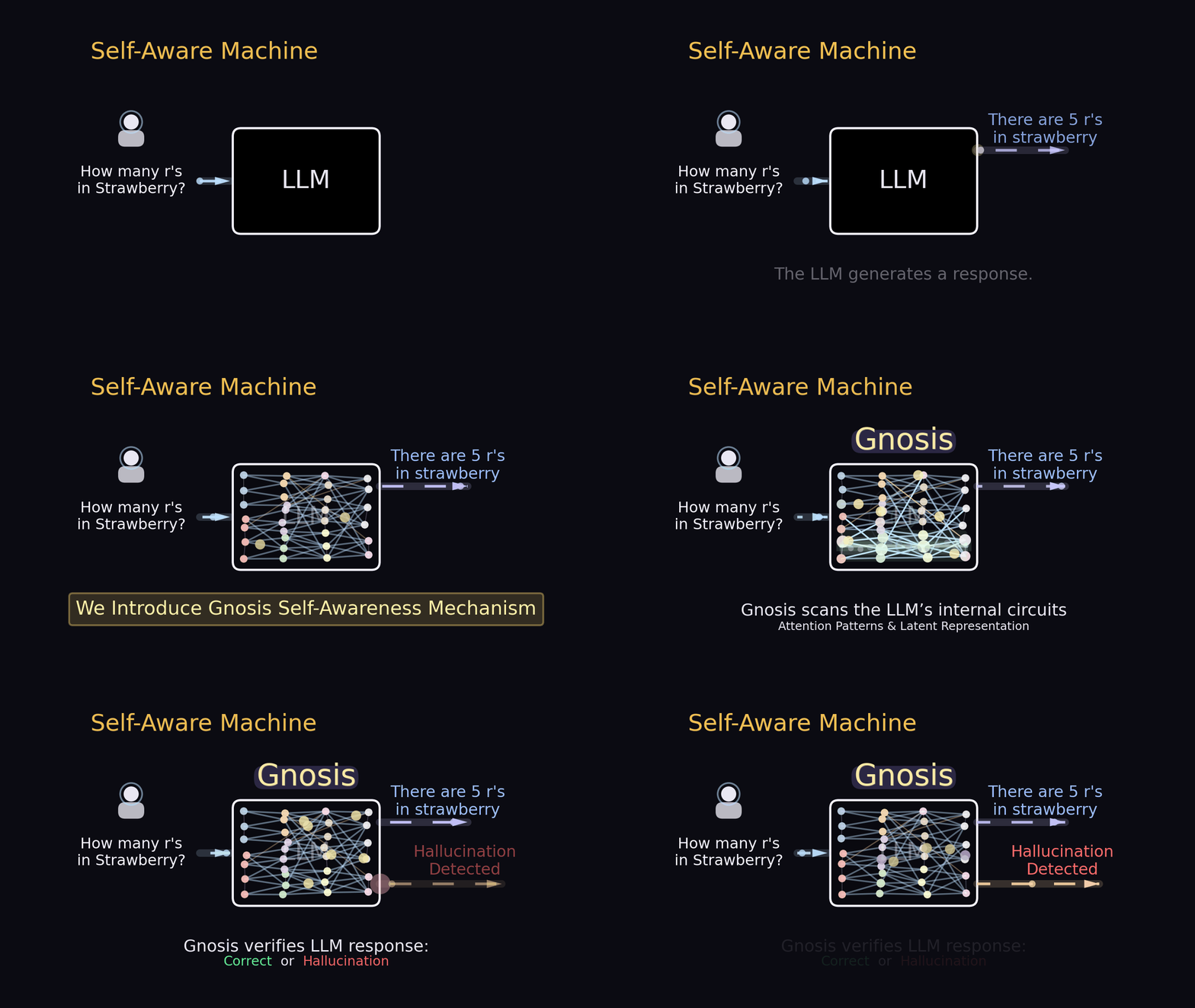
Overview of our Gnosis self-awareness mechanism and its performance.
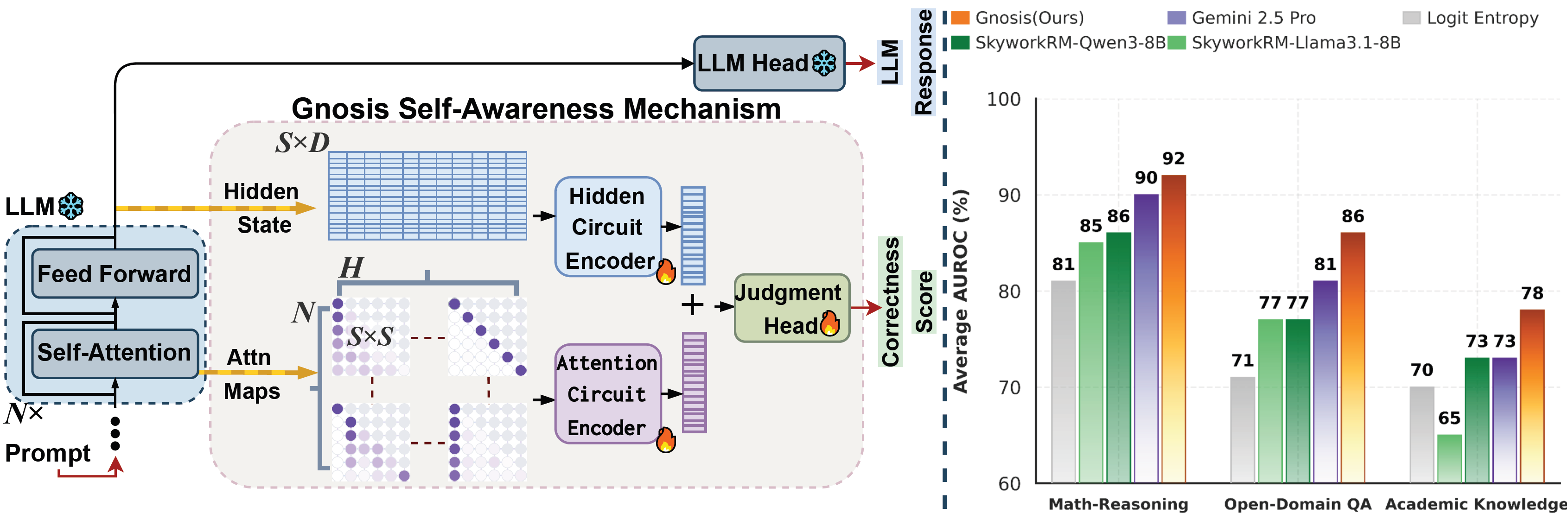
Gnosis is a lightweight self-awareness head attached to a (frozen) LLM backbone that predicts a scalar correctness probability for a generated response by reading the model’s hidden states + attention maps.
🚨 NEW RELEASE 🚨
Multi-Head Latent Control
From predicting failures to actively controlling agents
Building on Gnosis, our new work turns latent self-awareness into real-time deployment decisions. Multi-Head Latent Control reads the internal states of frozen LLMs to decide when to answer, continue reasoning, ask for clarification, use tools, abstain, or route to a stronger model—achieving higher success while reducing plotted API cost by up to ~90% in our reported AndroidWorld settings.

📁 Repository layout
transformers/— local Transformers fork with Gnosis integrated into the model architecture
transformers/src/transformers/models/gpt_oss
- transformers/src/transformers/models/qwen3
trl/— local TRL fork with a modifiedSFTTrainerto train the Gnosis head
trl/trl/trainer/sft_trainer.py
open-r1/— training code + configs
src/— inference + data tools (quickstart, scoring, preprocessing scripts)
🧩 Installation
✅ Option A: One-command setup
From repo root:
chmod +x scripts/setupgnosisenv.sh
bash scripts/setupgnosisenv.sh
conda activate Gnosis
🛠️ Option B: Manual install (exact steps)
<pre><code class="lang-bash">conda create -n Gnosis python=3.11 -y conda activate Gnosis
pip install --upgrade pip wheel setuptools pip install vllm==0.8.5.post1
python - <<'PY' import torch; print("Torch:", torch.version) PY
pip install flash-attn --no-build-isolation
pip uninstall -y transformers || true pip install -e ./transformers pip install -e "./trl[vllm]"
cd open-r1 GITLFSSKIP_SMUDGE=1 pip install -e ".[dev]" --no-deps cd ..
python - <<'PY' import pathlib, transformers, trl print("transformers →", pathlib.Path(transformers.file).resolve()) print("trl →", pathlib.Path(trl.file).resolve()) PY
export TOKENIZERS_PARALLELISM=false</code></pre>
⚡ Quickstart: Use Gnosis on a single question
In this example, we first generate a solution for a single question (via vLLM or HF generation), then run Gnosis on (prompt + answer) to output a scalar correctness probability.
Task options:
math, trivia, mmlu_pro
math / reasoning → step-by-step; final in \boxed{}
trivia → short factoid; final in \boxed{}
mmlu_pro → multiple-choice; final is only the letter in \boxed{}
<pre><code class="lang-python">import torch
from transformers import AutoTokenizer, AutoModelForCausalLM
from vllm import LLM
from src.demo import (
buildchatprompt,
makevllmsampling_params,
generatewithvllm,
generatewithhf,
correctness_prob,
)
GNOSISMODELID = "Trainedgnosismodel" VLLMMODELID = "Qwen/Qwen3-1.7B" USE_VLLM = False
SYSTEM_PROMPTS = { "math": "Please reason step by step, and put your final answer within \\boxed{}.", "trivia": "This is a trivia question. Put your final answer within \\boxed{}.", "mmlu_pro": "You are solving multiple-choice questions. Please reason step by step, and put your final answer with only the choice letter within \\boxed{}." }
tokenizer = AutoTokenizer.frompretrained(GNOSISMODELID, trustremote_code=True) model = AutoModelForCausalLM.from_pretrained( GNOSISMODELID, torch_dtype=torch.bfloat16, trustremotecode=True, ).cuda().eval()
prompt = buildchatprompt( tokenizer, question="How many r's are in strawberry?", systemprompt=SYSTEMPROMPTS["math"], )
if USE_VLLM: llm = LLM( VLLMMODELID, **{ "tensorparallelsize": 1, "maxmodellen": 12000, "dtype": "bfloat16", "gpumemoryutilization": 0.50, "trustremotecode": True, }, ) sp = makevllmsamplingparams(temperature=0.6, topp=0.95, maxtokens=10000) answer = generatewithvllm(llm, prompt, sp) else: answer = generatewithhf( model, tokenizer, prompt, torch.device("cuda"), maxnewtokens=10000, temperature=0.6, topp=0.95 )
pcorrect = correctnessprob( model, tokenizer, prompt + answer, torch.device("cuda"), maxlenfor_scoring=None )
print("Answer:\n", answer) print("Gnosis correctness probability:", f"{p_correct:.4f}")</code></pre>
🏋️ Training Gnosis
🧪 Step 1 — Data generation
Training begins with a simple pipeline: generate model completions (per dataset/benchmark) → verify them into binary correctness labels → merge + rebalance tasks (e.g., math + trivia) into one SFT-ready Parquet dataset.
➡️ Full, step-by-step instructions is provided in
DATA_PREPROCESS.md.
🚀 Step 2 — Train with
open-r1
Training configs live under:
open-r1/recipes/training/ (per-backbone YAMLs, e.g., Qwen3 / GPT-OSS, etc.)*
Example config:
open-r1/recipes/training/Qwen3/Qwen3-1.7Bhybridgnosis.yaml
To train:
<pre><code class="lang-bash">accelerate launch --configfile recipes/accelerateconfigs/zero2.yaml \   src/open_r1/sft.py \   --config recipes/training/Qwen3/Qwen3-1.7Bhybridgnosis.yaml</code></pre>
Note: This setup is currently configured for 2× A100 GPUs. Adjust the Accelerate/DeepSpeed config (and batch sizes, gradient accumulation, etc.) to match your available hardware.

📊 Evalution
We provide a convenience wrapper script to run the scorer on multiple benchmark shard directories (e.g., Math / TriviaQA / MMLU-Pro) and write all outputs under one folder.
Script:
src/evaluation/scripts/Gnosisrunall_scoring.sh It calls: src/evaluation/scorecompletionsGnosisoutputscoresscript_version.py
Edit these paths
MODEL="Pathtotrainedgnosisbackbone"
MATH10DIR=..., TRIVIADIR=..., MMLUPRO_DIR=... (dirs that contain shard-.parquet)
- OUTBASE="outputs/scoredruns/Gnosis"
Run
<pre><code class="lang-bash">bash src/evaluation/scripts/Gnosisrunall_scoring.sh</code></pre>
Outputs are saved in: outputs/scoredruns/Gnosis/scored/
Star History
Citation
If you find our work useful, please consider citing our paper in your research.@article{ghasemabadi2025can,
title={Can LLMs Predict Their Own Failures? Self-Awareness via Internal Circuits},
author={Ghasemabadi, Amirhosein and Niu, Di},
journal={arXiv preprint arXiv:2512.20578},
year={2025}
}


