
This workflow uses n8n, Gemini, and DataForSEO to create an AI agent that spies on your competitors, finds keyword gaps, and automates blog writing.
📺 Full Video Walkthrough & Setup Guide
Watch the full demo and setup guide on YouTube: Youtube VideoChat interface example: https://articollov2.vercel.app
This repository contains the complete workflow for Keywordo-kun, an AI agent specialized in competitor analysis, keyword research, and automated SEO content creation. 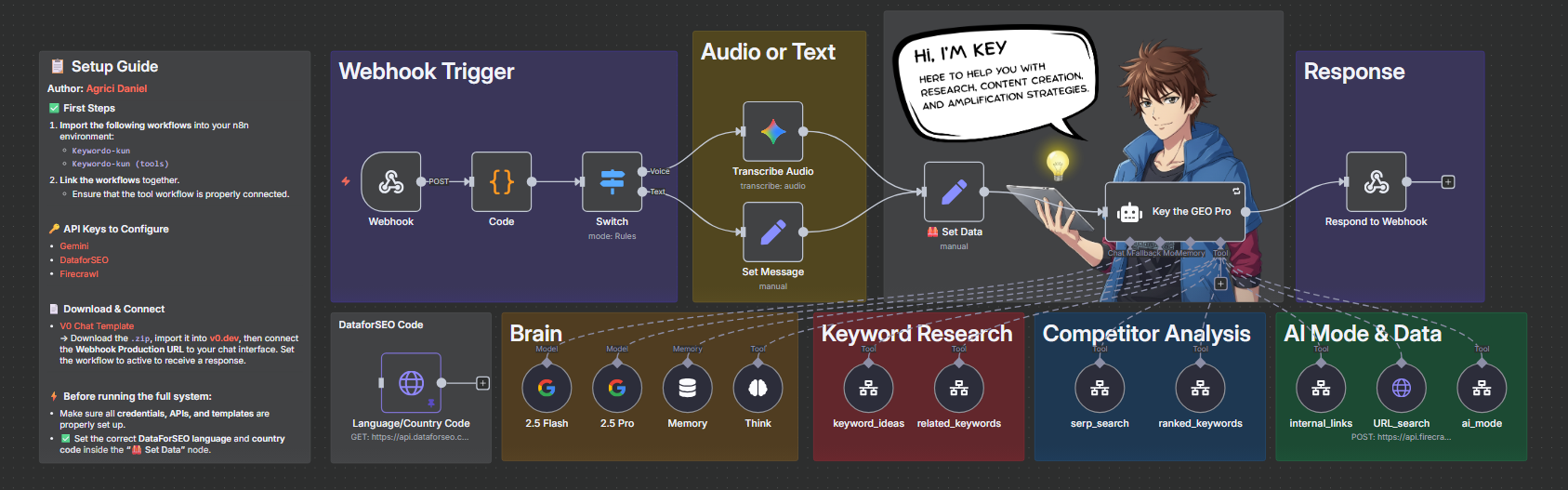 It's built for marketers, agencies, and SEO professionals who want to automate their research and writing process. The agent uses a powerful stack to analyze competitors, identify keyword opportunities, and generate high-quality, long-form blog posts.
🤖 How It Works: The Tool Stack
This project is built on n8n and v0.dev, connecting several key AI and data services:
- n8n: The central automation platform that runs the entire backend logic and agent "brain."
- v0.dev: Provides the sleek, conversational chat interface for the frontend.
- Google Gemini (2.5 Pro & Flash): Powers the agent's core reasoning, analysis, and content generation.
- DataForSEO: Provides the critical, real-time SERP data, keyword ideas, and competitor metrics.
- Firecrawl: Used to scrape and crawl websites for content analysis.
📂 What's Included in This Repository
This repository gives you all the components you need to deploy Keywordo-kun:
-
Keywordo-kun (Articollo Agent).json: The main n8n workflow. This is the "brain" of the agent that handles the user chat, processes requests, and calls the necessary tools. -
Keywordo-kun (Tools).json: The secondary n8n workflow. This file contains all the individual tools (e.g., "Get Keyword Ideas," "Analyze SERP") that the main agent calls upon. -
Keywordo-kun Chat Interface (v0.dev).zip: The complete frontend UI. You can import this zip file directly into v0.dev to deploy the chat interface. -
Keywordo-kun image.png: The project's hero image.
🚀 How to Set Up (Prerequisites)
To get this workflow running, you will need accounts and API keys for the following services:
- An n8n account (Cloud or self-hosted).
- A v0.dev account to host the chat interface.
- A Google AI Studio API key for Gemini.
- A DataForSEO account and API credentials.
- A Firecrawl API key.
🏁 Quick Setup Guide
- Deploy n8n Workflows:
Keywordo-kun (Tools).json file.
* Create a second workflow and import the Keywordo-kun (Articollo Agent).json file.
- Configure Tools Workflow:
- Configure Agent Workflow:
- Deploy Frontend:
Keywordo-kun Chat Interface (v0.dev).zip file.
* Get the production webhook URL from your "Agent" n8n workflow.
* In the v0.dev chat prompt, ask it to replace the old webhook URL with your new one, as shown in the video guide.
- Activate & Test:
For a full content publishing workflow powered by keyword research, see Rankenstein.
Author
Built by Agrici Daniel - AI Workflow Architect.
- Blog - Deep dives on AI marketing automation
- AI Marketing Hub - Free community, 2,800+ members
- YouTube - Tutorials and demos
- All open-source tools


