
AI agent to automatically check grammar and spelling on documentation files

AI spelling and grammar checker for documentation
🐦 Twitter • 📢 Discord • 🖇️ AgentOps


Spellcaster is an open-source CLI tool that uses AI to improve your codebase's documentation. It scans repositories for:
- Grammar errors
- Spelling mistakes
- Issues in code examples
https://github.com/user-attachments/assets/60dbfdb1-d5a6-4dfd-9707-37e60d60b24e
To run Spellcaster:
pip install spellcaster spellcaster -d /path/to/your/docs/directory/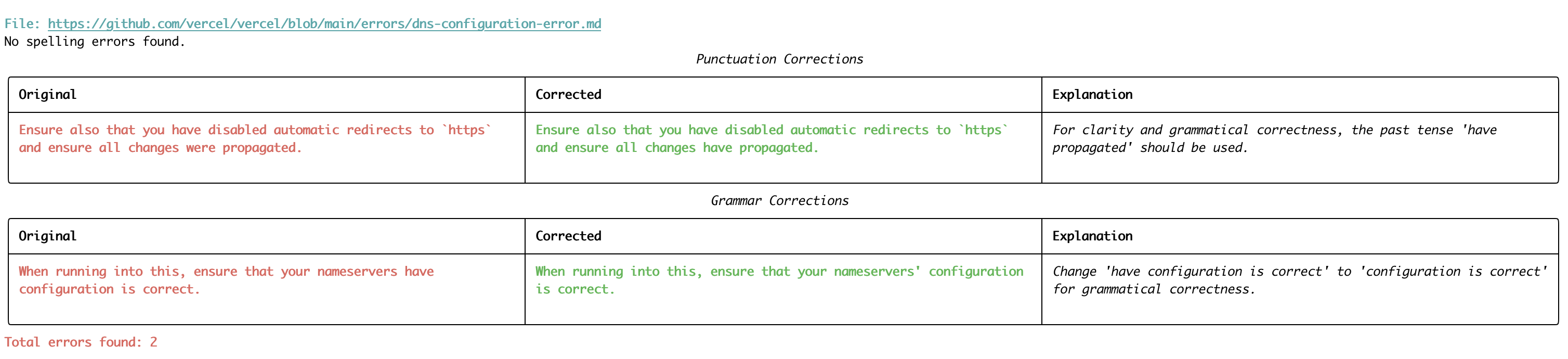
🦉 Features
- Grammar and Spelling Checks: Spellcaster reviews your documentation and comments to ensure they are clear, correct, and professional.
- Comprehensive File Scanning: Spellcaster reads across multiple file formats (Markdown, plain text, etc.) to detect issues.
Installation
- Install package:
pip install spellcaster- Set up environment variables:
.env file in your project root and add the following variables:
AGENTOPSAPIKEY=youragentopsapi_key
   ANTHROPICAPIKEY=youranthropicapi_key
   OPENAIAPIKEY=youropenaiapi_key
   GROQAPIKEY=yourgroqapi_key
Spellcaster uses AgentOps for cost and latency tracking. You can sign up for an API key here.
Replace your*api_key with your actual API keys for each service.
Usage
To run Spellcaster:
- In your terminal, use the following command structure:
spellcaster [options]Options: - -d, --directory: The directory to scan - -u, --url: The GitHub repository URL to clone and scan - -l, --llm_provider: The LLM provider to use (choices: claude, sonnet, 3.5, gpt4o, gpt4, gpt3.5; default: MODEL from config) - -p, --proper_nouns: A string of proper nouns to include in the prompt (default: " Llama3.1-70B\n Cerebras\n Cohere\n OpenAI\n AgentOps\n Spellcaster") - -f, --filetypes: File types to scan (default: from FILETYPES in config) - -m, --maxfiles: Maximum number of files to scan (default: MAXFILES from config)
- Examples:
spellcaster --directory /path/to/your/docs --llm_provider gpt4spellcaster --url https://github.com/username/repo- Spellcaster will analyze the specified directory or repository and output any detected issues, along with suggestions for fixing them.
Configuration
You can customize Spellcaster's behavior by adjusting the config.py file:
FILE_TYPES: A list of file extensions to scan. By default, it includes.mdxand.mdfiles. You can add or remove file extensions as needed.MAX_FILES: The maximum number of files to scan. By default, it's set to 500. You can change this number to suit your needs.MODEL: The default LLM provider to use. Model list available here.


