
空 A deep colorscheme for Neovim. Ethereal cyan, muted accents, near-black canvas.

A dark Neovim colorscheme. Ethereal cyan, cool silver, deep OLED blacks.
Install · Configure · Palette · Plugins · Extras

Philosophy
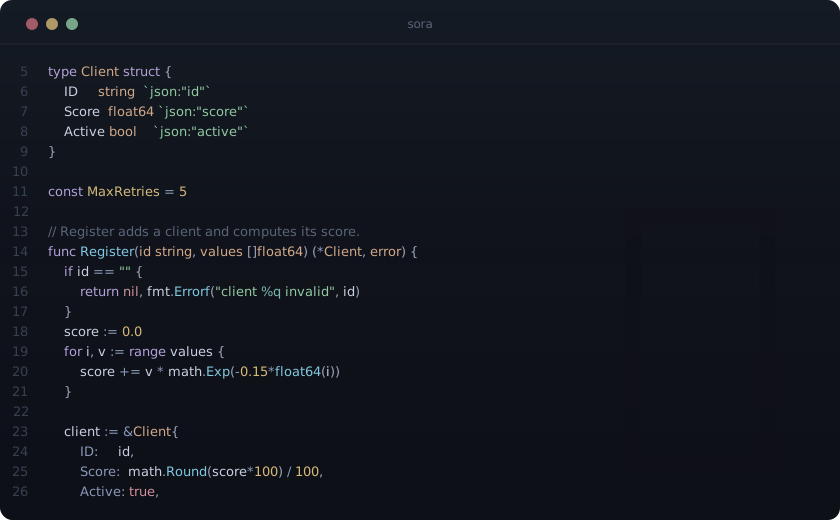
Sora sits between Tokyo Night's saturation and Lume's muted pastels. The background is near-black with a cool blue undertone, deep enough for OLED. Syntax colors are muted but readable - they don't compete with each other.
The signature ethereal cyan (#80c8e0) for functions is lighter and softer than Tokyo Night's blue, cooler than Lume's lavender. A single warm accent - gold (#d4b878) for constants and numbers - acts like a star against the cool palette. That one warm point in a field of cool tones is what gives Sora its look.
Eight named accents, each with a clear role. No neon, no Christmas tree.
Installation
lazy.nvim
{
  "Aejkatappaja/sora",
  lazy = false,
  priority = 1000,
  opts = {},
  config = function(_, opts)
    require("sora").setup(opts)
    vim.cmd("colorscheme sora")
  end,
}
packer.nvim
use {
  "Aejkatappaja/sora",
  config = function()
    require("sora").setup()
    vim.cmd("colorscheme sora")
  end,
}
mini.deps
MiniDeps.add("Aejkatappaja/sora")
require("sora").setup()
vim.cmd("colorscheme sora")
Configuration
Defaults - pass only what you want to change:
require("sora").setup({
  transparent = false,      -- transparent background (also strips float/statusline bg)
  italic = true,            -- italics globally
  italic_comments = true,   -- italics for comments (ignored if italic = false)
on_colors = function(colors) end,        -- override palette before highlights build   on_highlights = function(hl, colors) end, -- override highlight groups after they build })
Recipes
Transparent background
require("sora").setup({ transparent = true })No italics
require("sora").setup({ italic = false })
-- or keep italics everywhere but comments:
require("sora").setup({ italic_comments = false })
Pure black OLED background
require("sora").setup({
  on_colors = function(colors)
    colors.bg = "#000000"
    colors.bg_float = "#000000"
    colors.bg_statusline = "#000000"
  end,
})
Tweak a syntax color
oncolors runs before highlights build, so changing a palette key repaints every group that uses it. Keys live in lua/sora/palette.lua.
require("sora").setup({
  on_colors = function(colors)
    colors.func = "#a0d8f0"  -- brighter functions
    colors.string = colors.sage
  end,
})
Override highlight groups
on_highlights runs last and wins over everything. Use it for per-group control.
require("sora").setup({
  on_highlights = function(hl, colors)
    hl.Comment = { fg = colors.fg_comment, italic = true }
    hl.LineNr = { fg = colors.fg_gutter }
    hl.CursorLineNr = { fg = colors.cyan, bold = true }
    hl.FloatBorder = { fg = colors.border, bg = colors.bg_float }
  end,
})
Palette
| Role | Color | Hex | | :--------- | :-------------------------------------------: | :-------- | | Background | |
#0e1018 | | Foreground | |
#c8d0e0 | | Cyan | |
#80c8e0 | | Purple | |
#b0a0d8 | | Sage | |
#90c8a0 | | Peach | |
#d0a888 | | Gold | |
#d4b878 | | Rose | |
#d0909c | | Teal | |
#78b8b0 | | Steel | |
#8898b8 |
Supported Plugins
Sora includes highlight groups for:
- telescope.nvim
- nvim-cmp / blink.cmp
- gitsigns.nvim
- nvim-tree.lua / neo-tree.nvim / oil.nvim
- lualine.nvim (built-in theme)
- mini.statusline
- indent-blankline.nvim / snacks.nvim
- which-key.nvim
- trouble.nvim
- lazy.nvim / mason.nvim
- noice.nvim / nvim-notify
- flash.nvim / fzf-lua
- render-markdown.nvim
- dashboard-nvim
- treesitter-context
Lualine
require("lualine").setup({
  options = { theme = "sora" },
})
Extras
Sora everywhere:
| App | File | Install | |:----|:-----|:--------| | Zed | sora-theme | Extensions > search "Sora", or view in directory | | Ghostty | extras/ghostty/sora | cp to ~/.config/ghostty/themes/ | | Kitty | extras/kitty/sora.conf | include in kitty.conf | | Alacritty | extras/alacritty/sora.toml | import in alacritty.toml | | WezTerm | extras/wezterm/sora.toml | cp to ~/.config/wezterm/colors/ | | Foot | extras/foot/sora.ini | include in foot.ini | | Vim | extras/vim/sora.vim | cp to ~/.vim/colors/ | | Lazygit | extras/lazygit/sora.yml | merge into config.yml | | bat | extras/bat/sora.tmTheme | cp to $(bat --config-dir)/themes/ + bat cache --build | | Delta | extras/delta/sora.gitconfig | include in .gitconfig (install bat theme first) | | OpenCode | extras/opencode/sora.json | cp to ~/.config/opencode/themes/ | | fzf | extras/fzf/sora.sh | source in shell rc | | Starship | extras/starship/sora.toml | cp to ~/.config/starship.toml, or merge the [palettes.sora] block | | Yazi | extras/yazi/sora.toml | cp to ~/.config/yazi/theme.toml | | btop | extras/btop/sora.theme | cp to ~/.config/btop/themes/ | | tmux | extras/tmux/sora.tmux.conf | source-file in tmux.conf | | tokyo-night-tmux | extras/tmux/tokyo-night-tmux-sora.sh | see tmux below | | Slack | extras/slack/sora.txt | paste in Slack sidebar theme | | Firefox | extras/firefox/manifest.json | zip and load via about:debugging | | Firefox Start Page | extras/firefox-start/index.html | set as homepage file://... (edit USER const first) | | macOS Terminal | extras/macos-terminal/sora.terminal | double-click to import | | iTerm2 | extras/macos-terminal/sora.itermcolors | import in Preferences > Profiles > Colors | | Obsidian | sora-obsidian | Settings > Appearance > Themes > Manage > search "Sora", or view in directory |
tmux
For a basic tmux setup, add to your tmux.conf:
source-file /path/to/sora.nvim/extras/tmux/sora.tmux.confIf you use tokyo-night-tmux, paste the contents of extras/tmux/tokyo-night-tmux-sora.sh into the plugin's src/themes.sh (before the default *) case), then add to your tmux.conf:
set -g @tokyo-night-tmux_theme "sora"License
MIT


