
Effortlessly check your Cloud Kubernetes cluster's version and conveniently connect with all your clusters in just one click by utilizing this GO tool.
:sunbehindlargecloud: k8f :sunbehindlargecloud:
k8f is a command-line tool designed to simplify and streamline Kubernetes cluster operations.
It provides a collection of useful commands and features that assist in managing and interacting with Kubernetes clusters efficiently.
The tool was designed to scan all you're Azure and/or AWS Accounts for Kubernetes with a single command.
What can it do??
you can Add or Update EKS/AKS to your kubeconfig file.
you can get you're EKS/AKS output with k8s name, account, region, version, and upgrade status.
Table of Contents
- Table of Contents - prerequisite - Supported Platform - Known issues - Commands - list - connect - find - How to install - Windows - Linux - MacOS - Arm Processor - Intel Processor - Container
image created Using MidJorny
> 








[badge-info]: https://raw.githubusercontent.com/AdamRussak/public-images/main/badges/info.svg 'Info'
![badge-info][badge-info]
Tested with:
AWS CLI: 2.9.17
AZ CLI: 2.44.1
Kubectl: v1.26.1
prerequisite
- for Azure: installed and logged in azure cli
- for AWS: install AWS cli and Profiles for each Account at
~/.aws/credentialsand~/.aws/config - for GCP: Installed gcloud cli and logged in
Supported Platform
| Provider | CLI | Docker | |----------|----------|----------| | AWS | ☑ | ☑ | | Azure | ☑ | | | GCP | ☑ | |
Known issues
- GCP currently only supports the List command
- Azure accounts with MFA enabled can cause failure
Commands
list
List all K8S in Azure/AWS or Both
Usage:   k8f list [flags]
Examples: k8f list {aws/azure/all}
Flags:   -h, --help             help for list   -o, --output string    Set output type(json or yaml) (default "json")   -p, --path string      Set output path (default "./output")       --profile-select   Get UI to select single profile to connect   -s, --save             Get UI to select single profile to connect
Global Flags:       --aws-region string   Set Default AWS Region (default "eu-west-1")       --validate            Fail on validation of the AWS credentals before running   -v, --verbose             verbose logging
List Command Sample Output:
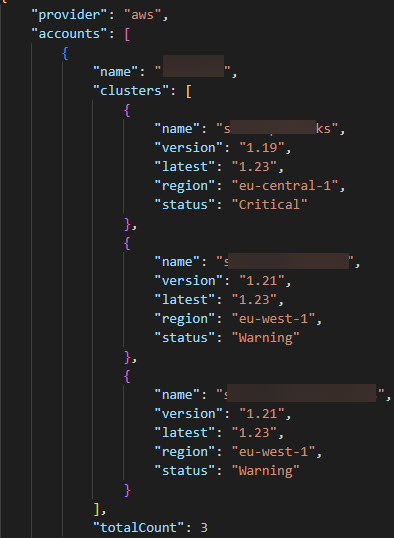
connect
Connect to all the clusters of a provider or all Supported Providers
Usage:   k8f connect [flags]
Examples: k8f connect aws -p ./testfiles/config --backup -v         k8f connect aws --isEnv -p ./testfiles/config --overwrite --backup --role-name "test role" -v
Flags:       --auth               change from AWS CLI Auth to AWS IAM Authenticator, Default set to AWS CLI       --backup             If true, backup config file to $HOME/.kube/config.bk       --dry-run            If true, only run a dry-run with cli output       --force-merge        If set, all duplication will be merged without prompt, default is interactive   -h, --help               help for connect       --isEnv              Add AWS Profile as Env to the Kubeconfig       --merge              If true, add new K8s to the existing kubeconfig path   -o, --output string      kubeconfig output type format(json or yaml) (default "yaml")       --overwrite          If true, force overwrite kubeconfig   -p, --path string        Set output path (default "/home/<user>/.kube/config")       --profile-select     provides a UI to select a single profile to scan       --role-name string   Set Role Name (Example: 'myRoleName')   -s, --short-name         shorten EKS name from <account>:<region>:<cluster> to <region>:<cluster>
Global Flags:       --aws-region string   Set Default AWS Region (default "eu-west-1")       --validate            Fail on validation of the AWS credentals before running   -v, --verbose             verbose logging
find
Find if a specific K8S exist in Azure or AWS
Usage:   k8f find [flags]
Examples: k8f find {aws/azure/all} my-k8s-cluster
Flags:   -h, --help   help for find
Global Flags:       --aws-region string   Set Default AWS Region (default "eu-west-1")       --validate            Fail on validation of the AWS credentals before running   -v, --verbose             verbose logging
How to install
Windows
Latest:$downloads = "$env:USERPROFILE\Downloads"
$source = "$downloads\k8f.exe"
$destination = "C:\tool"
Invoke-WebRequest -Uri "https://github.com/AdamRussak/k8f/releases/latest/download/k8f.exe" -OutFile $source
New-Item -ItemType Directory -Path $destination
Copy-Item -Path $source -Destination $destination
[Environment]::SetEnvironmentVariable("Path", "$env:Path;$destination\k8f.exe", "Machine")$downloads = "$env:USERPROFILE\Downloads"
$source = "$downloads\k8f.exe"
$destination = "C:\tool"
$version = "0.3.1"
Invoke-WebRequest -Uri "https://github.com/AdamRussak/k8f/releases/download/$version/k8f.exe" -OutFile "$downloads\k8f.exe"
New-Item -ItemType Directory -Path $destination
Copy-Item -Path $source -Destination $destination
[Environment]::SetEnvironmentVariable("Path", "$env:Path;$destination\k8f.exe", "Machine")Linux
Latest:cd ~ && wget https://github.com/AdamRussak/k8f/releases/latest/download/k8f
sudo cp ~/k8f /usr/local/bin/k8f
sudo chmod 755 /usr/local/bin/k8fcd ~ && wget https://github.com/AdamRussak/k8f/releases/download/<version>/k8f
sudo cp ~/k8f /usr/local/bin/k8f
sudo chmod 755 /usr/local/bin/k8fMacOS
Arm processor
Latest:cd ~ && wget https://github.com/AdamRussak/k8f/releases/latest/download/k8f_darwin-arm64
mv k8f_darwin-arm64 ./k8f
sudo cp ~/k8f /usr/local/bin/k8f
sudo chmod 755 /usr/local/bin/k8fcd ~ && wget https://github.com/AdamRussak/k8f/releases/download/<version>/k8f_darwin-arm64
mv k8f_darwin-arm64 ./k8f
sudo cp ~/k8f /usr/local/bin/k8f
sudo chmod 755 /usr/local/bin/k8fIntel processor
Latest:cd ~ && wget https://github.com/AdamRussak/k8f/releases/latest/download/k8f_darwin-amd64
mv k8f_darwin-amd64 ./k8f
sudo cp ~/k8f /usr/local/bin/k8f
sudo chmod 755 /usr/local/bin/k8fcd ~ && wget https://github.com/AdamRussak/k8f/releases/download/<version>/k8f_darwin-amd64
mv k8f_darwin-amd64 ./k8f
sudo cp ~/k8f /usr/local/bin/k8f
sudo chmod 755 /usr/local/bin/k8fContainer
# Basic
docker run -v {path to .aws directory}:/home/nonroot/.aws/:ro unsoop/k8f:<version> <command>
Automation Queryable output
OUTPUT=$(docker run -v {path to .aws directory}:/home/nonroot/.aws/:ro unsoop/k8f:<version> <command> 2> /dev/null | grep -o '{.*}')


