A simple Python API for single camera calibration using opencv
Last updated Jun 10, 2026
70
Stars
25
Forks
1
Issues
0
Stars/day
Attention Score
6
Topics
Language breakdown
No language data available.
▸ Files
click to expand
README
cameracalibrationAPI
A repository containing the camera calibration API
Repository Overview:
camera_calibration.py:contains an API which tries to minic the MATLAB's camera calibration app functionality. This API is a thin wrapper around the opencv's camera calibration functionalities.
examples: A directory containing various examples
CameraCalibrationAPI:
Introduction:
The Camera Calibration API is a wrapper around the opencv's camera calibration functionalities. This tries to mimic the MATLAB camera calibration app's functionality inpython. The API supports all the 3 calibration patterns supported by opencv namely: Chessboards, Asymmetric circular grids and Symmetric circular grids. The API by default runs on 4 threads for speedup. The speed-up may not be marginal in the case of chessboard calibration because in most cases the bottle neck will be a single chessboard image (run on a single core) which the algorithm takes time to detect.
Dependencies:
works in both python-3 and python-2opencv (Tested in version 3.3.0)numpymatplotlibpickleargparseglobpicklemultiprocessingospandas
Example:
Examples to use the CameraCalibrationAPI() for calibration using chessboard, symmetric circular grids and asymmetric circular grids can be found in the example_notebooks folderFeatures:
- Supports all the 3 calibration patterns supported by opencv : Chessboards, Asymmetric circular grids and Symmetric circular grids.
- Additionally a custom calibration pattern can also be implemented. (Look at the next section for how to calibrate using custom pattern.)
- Visualizes the Reprojection error plot
- Ability to Recalibrate the camera by neglecting the images with very high reprojection errors.
- Camera centric and Pattern centric views can be visualized using the
visualizecalibrationboardsmethod after calibration. Blob detection parametersfor detecting asymmetric and symmetric circular grids can be accessed and modified via the CameraCalibrationAPI's object prior to calling thecalibrate_cameramethod- Also has
terminalsupport with minimal control on the variables. Use it as an importable module for better control over the variables - Can also be easily extended to support other unimplemented calibration patterns
Using custom calibration board with the CameraCalibrationAPI.
So you want to extend the API for a custom calibration pattern? Well... OK! Just follow the follow the steps below
- The
calibratecameraaccepts two additional arguments calledcustomworldpointsfunctionandcustomimagepoints_function. - You must implement the above two custom methods and pass it as an argument to the
calibrate_cameramethod
customworldpointsfunction(patternrows,pattern_columns):
- This function is responsible for calculating the 3-D world points of the given custom calibration pattern.
- Should take in two keyword arguments in the following order: Number of rows in pattern(int), Number of columns in pattern(int)
- Must return only a single numpy array of shape (M,3) and type np.float32 or np.float64 with M being the number of control points of the custom calibration pattern. The last column of the array (z axis) should be an array of 0
- The distanceinworld_units is not multiplied in this case. Hence, account for that inside the function before returning
- The world points must be ordered in this specific order : row by row, left to right in every row
customimagepointsfunction(img,patternrows,pattern_columns):
- This function is responsible for finding the 2-D image points from the custom calibration image.
- Should take in 3 keyword arguments in the following order: image(numpy array),Number of rows in pattern(int), Number of columns in pattern(int)
- This must return 2 variables: returnvalue, imagepoints
- The first one is a boolean Representing whether all the control points in the calibration images are found
- The second one is a numpy array of shape (N,2) of type np.float32 containing the pixel coordinates or the image points of the control points. where N is the number of control points.
- This function should return True only if all the control points are detected (M = N)
- If all the control points are not detected, fillup the 2-D numpy array with 0s entirely and return with bool == False.
- The custom image points must be ordered in this specific order: : row by row, left to right in every row
Supported Calibration patterns (rows x columns) bydefault:
Chessboard or Checkerboard pattern (6 x 9):

Asymmetrical circular grid/pattern (4 x 11):
 .
.
NOTE for calibrating using Asymmetric circular grid:
- The code assumes that each asymmetric circle is placed at half the
distanceinworld_unitsin both (x,y) from each other.
- The
distanceinworld_unitsis specified as the distance between 2 adjacent circle centers at the same y coordinate
- The above is a 4 x 11 (r x c) asymmetrical circular grid.
- If you are using the same orientation as the above, Then this orientation is termed as doublecountin_column which is by default set to
True.
- If you are using an orientation which is 90deg to the above orientation 11 x 4 (r x c) then the
double countis along the rows. In this case, setobject.doublecountincolumn = Falseprior to callingobject.calibratecameramethod.
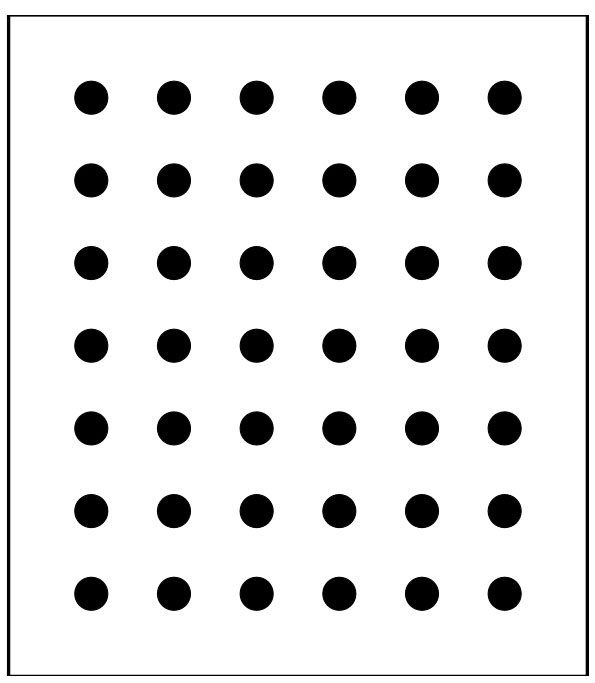
Symmetric circular grid/pattern (7 x 6):