
Multi-cluster Kubernetes usage analytics for CPU, Memory, and GPU — track costs and optimize cluster resources


- Create a Krossboard CR - Create a KUBECONFIG secret for target Kubernetes - Start the Krossboard Instance
What is Krossboard
Krossboard is a Kubernetes Operator designed to provide comprehensive usage tracking, analytics, and accounting across diverse Kubernetes environments. It supports cross-site deployments (e.g., geographically dispersed clusters) and cross-distribution management (e.g., vanilla Kubernetes, OpenShift, EKS, AKS, GKE, and other distributions).
Krossboard enables enterprises to gain insights into resource consumption, perform cost analysis, and centralize monitoring across multiple Kubernetes clusters. For example, it helps manage resource usage across multiple cloud providers and provides detailed cost analysis for hybrid deployments. Check out the documentation for more details.
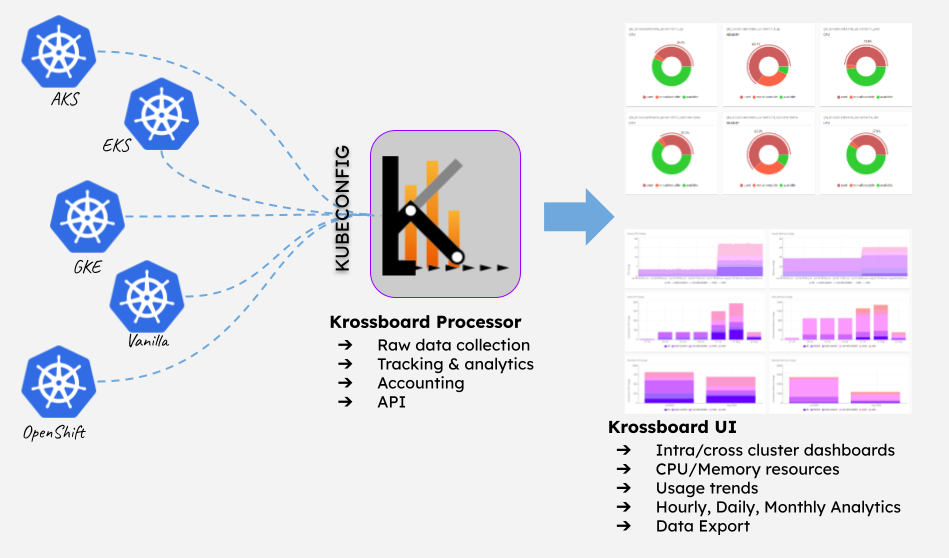
Once the Operator installed, the Krossboard CR allows to define a Krossboard instance as a Kind, as well as parameters to bootstrap that instance: krossboard-api, krossboard-ui, krossboard-consolidator, krossboard-kubeconfig-handler, kube-opex-analytics instances.
Each instance of Krossboard enables to track the usage of a set of Kubernetes clusters listed in a KUBECONFIG secret.
The next steps describe how to deploy the operator and a Krossboard instance.
Learn more about Krossboard Features
Deploy Krossboard
The following command deploy the latest version of Krossboard Operator.kubectl apply -f https://raw.githubusercontent.com/2-alchemists/krossboard-kubernetes-operator/main/config/releases/latest/krossboard/krossboard-kubernetes-operator.yamlThe installation is achieved in a namespace named krossboard.
Deploy a Krossboard Instance
Create a Krossboard CR
Once the operator deployed, a custom resource named Krossboard is created. This CR is used to define each instance of Krossboard.
See krossboard.yaml for an example to a Krossboard instance along with its persistent volume claim.
---
apiVersion: krossboard.krossboard.app/v1alpha1
kind: Krossboard
metadata:
  name: krossboard
  namespace: krossboard
spec:
  koaImage: rchakode/kube-opex-analytics:25.03.1
  krossboardDataProcessorImage: krossboard/krossboard-data-processor:1.3.0
  krossboardUIImage: krossboard/krossboard-ui:1.2.2-d49718c
  krossboardPersistentVolumeClaim: krossboard-data-pvc
  krossboardSecretName: krossboard-secrets

apiVersion: v1
kind: PersistentVolumeClaim
metadata:
  name: krossboard-data-pvc
  namespace: krossboard
spec:
  accessModes:
    - ReadWriteOnce
  resources:
    requests:
      storage: 1Gi
 storageClassName: uncomment-and-set-if-not-using-default
Each instance of Krossboard allows to track the usage of a set of Kubernetes clusters listed in a KUBECONFIG secret.
- The secret name is set by the parameter
krossboardSecretName(default iskrossboard-secrets). - The secret key is
kubeconfig.
Create a KUBECONFIG secret for target Kubernetes
Given a KUBECONFIG resource (/path/to/kubeconfig in the below command), you can create a secret for Krossboard Operator as follows.
kubectl -n krossboard \
    create secret --type=Opaque generic krossboard-secrets \
    --from-file=kubeconfig=/path/to/kubeconfig
* Learn how to Create a KUBECONFIG resource with minimal permissions for Krossboard.
* Learn how to Create a secret from several KUBECONFIG resources
Start the Krossboard Instance
The below command deploys an instance of Krossboard based on the latest version.kubectl -n krossboard apply -f https://raw.githubusercontent.com/2-alchemists/krossboard-kubernetes-operator/main/config/releases/latest/krossboard/krossboard-deployment.yamlOnce started, the instance enables access to two Kubernetes services:
krossboard-ui.krossboard.svcenabling access to Krossboard UI.krossboard-api.krossboard.svcenabling access to Krossboard REST API.
Day2 Operations
- https://krossboard.app/
- Krossboard Enterprise Support


