
AI-agent workspace for quantitative trading — backtest, validate, and paper trade strategies with multi-agent collaboration
English · 한국어 · 中文 · 日本語 · Español
QuantDesk
AI-agent workspace for quantitative trading


What is QuantDesk?
Find profitable strategies fast — before the market moves on.
In the vibe coding era, hundreds of products ship every day, but maintenance and iteration are the real bottleneck. Trading strategies are different: a strategy that works for one day is already profitable. When it stops working, you find the next one.
The hard part isn't writing the code — it's the tedious cycle of downloading data, backtesting, tweaking parameters, checking for overfitting, and validating in paper mode. QuantDesk automates this entire loop with AI agents so you can focus on the ideas, not the plumbing.
Every script runs inside an isolated Docker container. Nothing touches your host machine — strategies, backtests, data fetches, and paper trading all execute in sandboxed containers with pinned images. Your local environment stays clean no matter what the agent writes.
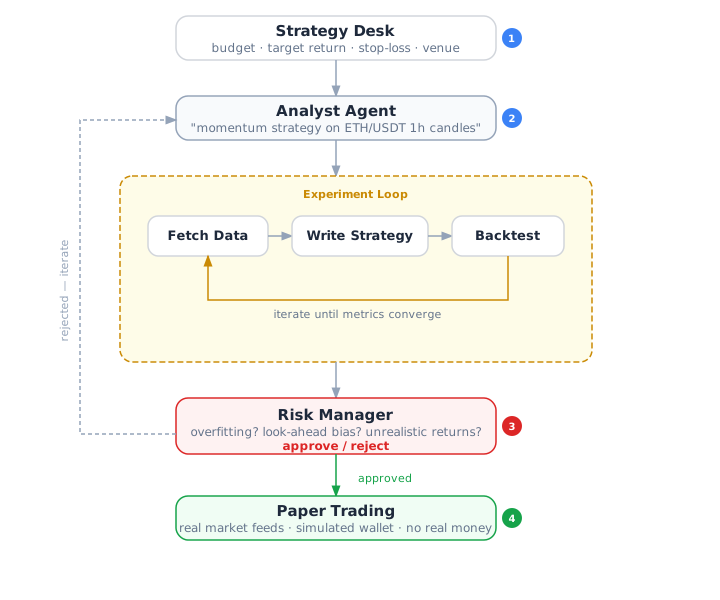
| | Step | What happens | | ------ | ------------------------- | ------------------------------------------------------------------------------------------------------ | | 01 | Describe your strategy | Tell the Analyst agent what you want to trade — in plain English. Or pick from the curated catalog. | | 02 | Backtest and iterate | The agent writes strategy code, fetches data, runs backtests, and iterates based on results. | | 03 | Validate with Risk Manager | Flag the results for validation. The Risk Manager checks for overfitting, bias, and anomalies. | | 04 | Paper trade | Promote an approved strategy to paper trading. Real market data, fake money. Prove it works live. |
QuantDesk is right for you if
- You want to research and validate trading strategies faster than manual backtesting allows
- You have trading ideas but don't want to wire up data pipelines, engine configs, and Docker containers yourself
- You want an AI that writes, runs, and iterates on strategy code — not just generates text
- You want a Risk Manager that independently validates results before you risk capital
- You want to paper trade validated strategies against live markets without touching real money
- You want one workspace that tracks experiments, datasets, runs, and code versions in one place
Features
|
Analyst Agent Writes strategy code, fetches market data, runs backtests, and iterates based on results. Speaks your language — describe a thesis in plain English and the agent builds it. |
Risk Manager Independent validation agent. Checks for overfitting, look-ahead bias, survivorship bias, and unrealistic assumptions. Blocks paper trading until it approves. |
Paper Trading Promote approved strategies to paper mode. Real market feeds, simulated wallet. Prove a strategy works before going live — no API keys, no real money at risk. |
|
Experiment Tracking Every hypothesis gets its own experiment. Compare runs side-by-side with normalized metrics across different engines and timeframes. |
Code Versioning Per-desk git workspace. The agent commits on every change. Each run links to its exact commit hash — full reproducibility. |
Pluggable Engines Freqtrade for classic TA strategies. Nautilus Trader for event-driven tick-level strategies. Generic fallback for anything else — the agent writes scripts in Python, Node, Rust, or Go. |
Workflow
Why not just let AI trade directly?
QuantDesk does not focus on AI agents executing trades autonomously. That approach is cost-inefficient and unrealistic at scale.
Most profitable trading is a research process: collecting data, backtesting hypotheses, tweaking parameters to avoid overfitting, and validating in paper mode before committing capital. The bottleneck is the iteration speed of this loop — not the execution.
QuantDesk puts AI agents where they add the most value: automating the research and validation cycle so you can test more ideas, faster.
Paper trading is the furthest QuantDesk goes. Live trading requires exchange API keys or wallet private keys — that's a different trust model and an explicit non-goal for this project.
Supported Venues
| Crypto (CEX) | Binance · Bybit · OKX · Kraken · Gate.io · KuCoin · HTX · Bitget · BitMart · BingX · Bitvavo · BitMEX · Deribit |
| Crypto (DEX) | Hyperliquid · dYdX |
| Prediction Markets | Polymarket · Kalshi · Betfair |
| Stocks | Interactive Brokers |
Engine resolution is automatic: pick a strategy mode (classic or realtime) and a venue — the system resolves the engine for you.
| Mode | Engine | Best for | |------|--------|----------| | classic | Freqtrade | Candle-based TA strategies — trend following, mean reversion, momentum | | realtime | Nautilus Trader | Event-driven tick-level strategies — market making, arbitrage, HFT | | (fallback) | Generic | Any venue without a managed engine — agent writes scripts in Python/Node/Rust/Go |
Quickstart
Open source. Self-hosted. No account required.
npx quantdesk onboard --yesThat's it. Clones the repo, installs dependencies, pulls engine Docker images, migrates the database, and starts the server at http://localhost:5173.
An embedded PostgreSQL boots in-process — no Docker needed for the database. Docker is used exclusively for engine containers.
Requirements: Node.js 20+, pnpm 9.15+, Docker (running), Claude CLI (claude) or Codex CLI (codex)
Manual setup
git clone https://github.com/0xbet-ai/QuantDesk.git
cd QuantDesk
pnpm install
pnpm onboard --yes
Authentication
By default QuantDesk runs in local trusted mode — no login, single user, zero configuration. This is ideal for local development.
To enable login (for shared servers or cloud deployments):
QUANTDESKDEPLOYMENTMODE=authenticated pnpm devOn first visit you'll see a sign-up page. Create your account with email and password — that's it.
| Variable | Default | Description | |----------|---------|-------------| | QUANTDESKDEPLOYMENTMODE | local_trusted | Set to authenticated to require login | | BETTERAUTHSECRET | quantdesk-dev-secret | Session signing secret — change this in production | | DATABASE_URL | (embedded) | External Postgres URL for shared deployments |
For production, also set auth.disableSignUp: true in ~/.quantdesk/config.json after creating your account to prevent unauthorized sign-ups.
Development
pnpm dev           # Start server + UI (dev mode)
pnpm build         # Build all packages
pnpm typecheck     # TypeScript type checking
pnpm check         # Biome lint + format
pnpm test          # Vitest test suite
pnpm db:migrate    # Run Drizzle migrations
pnpm db:reset      # Reset DB and re-seed
See doc/OVERVIEW.md for architecture and CLAUDE.md for project rules.
Tech Stack
| Layer | Choice | |-------|--------| | Monorepo | pnpm workspaces | | Backend | Express.js + WebSocket | | Database | PostgreSQL 17 (embedded), Drizzle ORM | | Frontend | React 19, Vite, Tailwind CSS, Radix UI | | AI Agent | Claude CLI / Codex CLI subprocess | | Engines | Freqtrade, Nautilus Trader, Generic (Docker) | | Validation | Zod | | Testing | Vitest | | Linting | Biome |
Contributing
Contributions welcome. See the contributing guide for details.
License
AGPL-3.0
Open source under AGPL-3.0. Built for people who trade ideas, not keystrokes.


